Missing Funds and Fixes
Crypto Sent to Binance but Not Showing? Four Checks Before You Apply
A crypto deposit that has not landed on Binance is usually one of four things: an unconfirmed transaction, a confirmation count you have not reached, a missing MEMO or an amount below the credit threshold. Check those before you spend the hour Binance asks you to wait, then apply for self-service recovery with the right evidence.
You sent USDT from VALR, Luno or a personal wallet, the sending side says it is done, and your Binance balance has not moved. The instinct is to open a support ticket straight away. Binance's own recovery page sets a different starting point: you apply only if the funds still have not arrived one hour later.
That hour is not dead time. Four checks, in this order, explain most missing deposits — and three of the four you can settle yourself without any ticket at all.
Check 1: is the transaction actually confirmed on the blockchain?
Open the sending platform's transaction history and copy the TxID (also written TxHash). Paste it into the block explorer for that network and read the status.
Binance is explicit about what it can work with: "Please only submit applications for transactions that are marked as 'confirmed/success' on the blockchain. We cannot assist you if the transaction is marked as 'unconfirmed' or 'failed'."
So if the explorer says pending, dropped or failed, this is not a Binance problem yet. It belongs to the sending platform or the network, and you should chase VALR, Luno or your wallet provider instead. If the sending side shows the withdrawal as still queued for review — common with a first withdrawal or a newly whitelisted address — nothing has hit the chain at all.
Check 2: has the network reached the confirmation count Binance waits for?
A transaction can be confirmed on the explorer and still not show on Binance, because Binance waits for a set number of confirmations per network before it credits anything. Those numbers differ enormously between chains.
The figures below come from the public coin-network data the Binance deposit page itself reads, queried on 20 September 2026 for USDT.
| USDT network | Confirmations before it is credited | Smallest amount that gets credited |
|---|---|---|
| Tron (TRC20) | 1 | 0.01 USDT |
| BNB Smart Chain (BEP20) | 1 | 0.01 USDT |
| Solana | 1 | 0.001 USDT |
| The Open Network (TON) | 1 | 0.001 USDT |
| Ethereum (ERC20) | 6 | 0.001 USDT |
| Optimism | 25 | 0.001 USDT |
| Arbitrum One | 120 | 0.001 USDT |
| Polygon POS | 200 | 0.02 USDT |
Two practical consequences. First, a Polygon POS transfer needs 200 confirmations before it appears, so a few minutes of nothing happening is normal and panicking at minute three is premature. Second, there is a separate, higher number for unlocking: the same data lists 64 confirmations on Ethereum, 100 on Optimism, 120 on Arbitrum One and 300 on Polygon POS before a credited balance can be moved again. A balance that shows up but refuses to transfer is usually this, not a frozen account.
If you are still deciding which chain to use for the next transfer, the trade-off between fee and waiting time is the whole point of picking the right USDT network when you move funds out of VALR or Luno.
Check 3: did the deposit need a MEMO or tag that you left blank?
Most USDT networks use a plain address with nothing else attached. On 20 September 2026, out of the 19 USDT networks Binance listed, TON was the only one flagged as requiring a MEMO. XRP on its own network uses a Tag. If you sent one of those and left the field empty, the funds are not lost, but they will not self-correct either: Binance routes missing or wrong memo/tag deposits through a separate recovery form, and the published turnaround is 7 working days with a network withdrawal fee charged on success.
Check the amount as well. Anything below the "smallest amount that gets credited" column above is simply not picked up — 0.02 USDT on Polygon POS, 0.01 on Tron and BNB Smart Chain. Test transfers of a few cents fall into that gap more often than people expect.
Check 4: is that network paused on Binance's side?
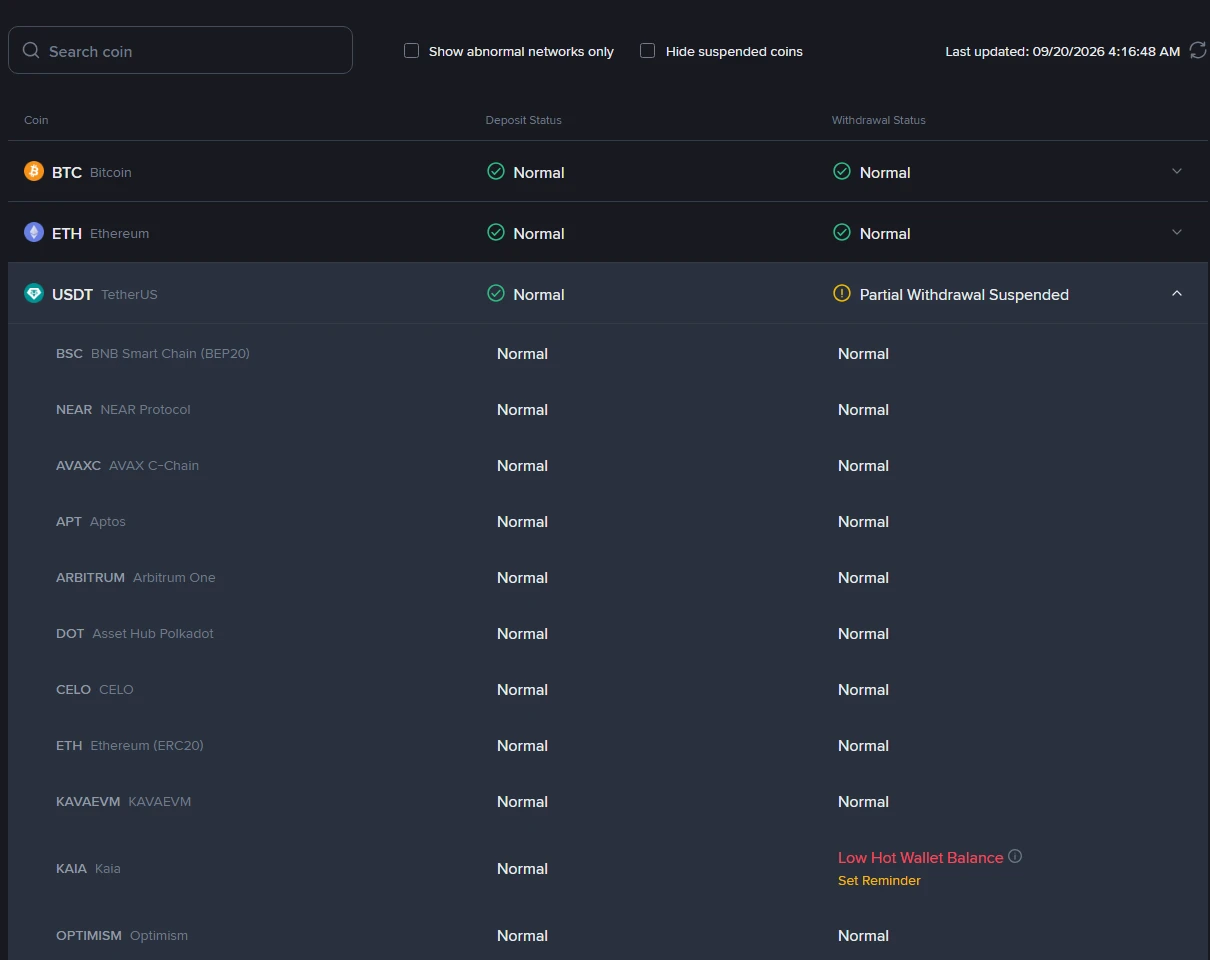
Binance publishes a live Deposit & Withdrawal Status page that anyone can read without logging in. Search for the coin, expand the row, and every network is listed separately with its own deposit status and withdrawal status.
This matters because the coin-level label summarises all the networks underneath it. In the screenshot above, taken on 20 September 2026, USDT deposits read Normal across the board while the coin-level withdrawal label said "Partial Withdrawal Suspended" — the only USDT network not in a normal withdrawal state that day was Kaia, flagged "Low Hot Wallet Balance". Everything else was running. Reading only the top line would have misled you in both directions.
If your network does show a suspension or maintenance notice, the deposit is queued rather than gone, and a recovery application will not speed it up.
Only now: the self-service recovery application
If the transaction is confirmed, the network is running, the confirmation count has been passed and an hour has gone by, you have a genuine case.
Binance describes recovery as available for deposits into your own account that are confirmed on-chain, plus specific situations such as a missing or wrong memo/tag, "smart retrieval" for certain unlisted tokens (the deposit history shows the status as "Wrong Deposit" and gives you a [Retrieve now] button), and deposits that meet the BNB Pioneer Burn Program conditions.
It is equally explicit about what it will not take:
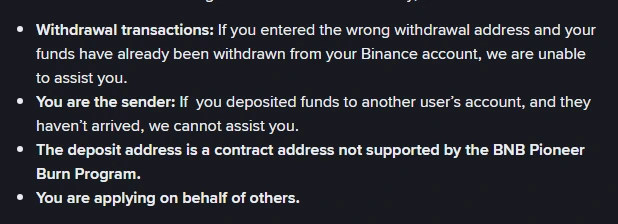
The most painful item on that list is the second one. If you sent funds to someone else's Binance account and they never arrived, you cannot apply on their behalf — the account holder has to.
You will be asked for the TxID, the coin, the network, the deposit address exactly as the explorer shows it under "to address", and the amount to eight decimal places with no thousands separators. Binance may also ask for a video proving the deposit is genuine, and if the deposit was a withdrawal returned by another platform, for your correspondence with that platform including the TxID. Applications are tracked under [Application Records].
What it costs and how long it takes
Fees are only charged if the retrieval succeeds, and the amount appears under your application. The published table:
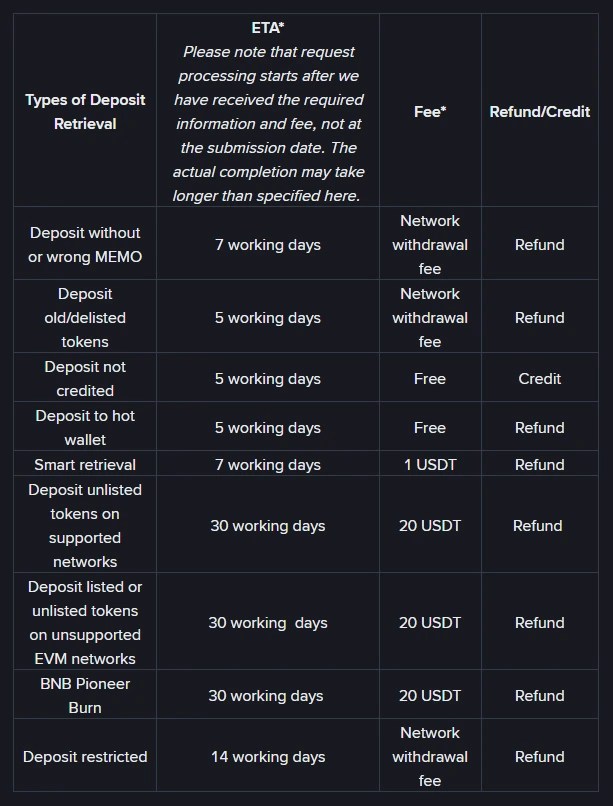
The ordinary case — "Deposit not credited" — is free and quoted at 5 working days, with the funds credited rather than refunded. The expensive rows are the unusual ones: unlisted tokens or unsupported EVM networks run 30 working days at 20 USDT. Binance notes that the clock starts once it has the required information and fee, not from your submission date, and that successful recovery is not guaranteed.
Why applications get rejected
The official list of common rejection reasons is worth reading before you submit, because most of the entries are avoidable: a TxID and address that do not match each other, an amount that does not match the blockchain record, a transaction that had already arrived, a transaction that is unconfirmed or cannot be found on-chain, a zero-value transaction, something that is not a deposit at all (a withdrawal, or a fiat or account issue), and a contract address outside the BNB Pioneer Burn Program conditions.
Copy and paste the TxID and the address rather than typing them. That one habit removes the most common rejection.
If nothing left your bank in the first place
This article is about crypto that moved on-chain. A ZAR payment that never became crypto is a different chain of custody with different evidence — see what actually happens when a card payment is declined, or step back and compare the routes for getting rand into Binance before the next attempt.
Sources
- Binance FAQ: How to Retrieve a Deposit That Hasn't Arrived With Self-Service Recovery? (page shows published 2021-05-25, updated 2026-05-28)
- Binance Deposit & Withdrawal Status page (screenshot taken 20 September 2026)
- Confirmation counts and minimum credited amounts: Binance's public coin-network data for USDT, read on 20 September 2026.
Network parameters, statuses and fees change without notice. Re-check the two pages above before you act on any number here.
If you have not registered yet
Read the Binance referral-code guide. It explains how to verify the official domain, code CG17CR7R and the advertised benefit of up to 20% in trading-fee rebates. Eligibility, products and the final rate depend on the registration page and account terms; Zovrino may receive a commission from an eligible referral. A referral link does not change any of the deposit rules above.
The code we use is CG17CR7R (link). Typing binance.com yourself gives you the same account.