Eligibility and Referral
Binance Verification Failed in South Africa? Fix It Step by Step
Binance identity verification failed? Work out whether the ID photo, liveness check, personal details or proof of address caused it, fix that one step, and note the 3-month proof-of-address period Binance lists for South Africa.
A rejected Binance verification usually tempts people to grab a different document, take new photos and submit everything again straight away. That can work, but if you do not know which check failed, a fresh submission can repeat the same mistake.
Identity verification sits between registration and your first deposit. Binance's own FAQ says all new users must complete the [Verified] level to access its products, including crypto deposits and trades. This guide splits the official process into the checks that can fail, shows what Binance's help pages ask for at each one, and ends with a resubmission order. For South African readers there is one extra detail worth knowing before you upload anything: the proof-of-address validity period Binance lists for South Africa is shorter than its default.
Verification note: this article is based on three official Binance FAQ pages (listed under Sources), read on 13 September 2026, UTC+8. Zovrino did not log into an account or submit documents for this article. The flow screenshots are the sample screens Binance publishes in its FAQ, which use Singapore as the example country, so the options on your own South African account may look different. Treat what your account shows as the current source of truth.
First, work out which check failed
Look at the verification page and any email from Binance, then match the problem to one of these checks:
| Check | What Binance's FAQ asks for | Look at this before resubmitting |
|---|---|---|
| ID document | Original ID, all information visible | Copy or screenshot, cut-off corners, glare, expired or damaged ID |
| Liveness check | Camera access, no hats, glasses or filters, enough light | Browser camera permission, backlight, beauty filters |
| Personal details | Everything consistent with your ID | Spelling, date of birth, address fields |
| Proof of address (if requested) | Your name and home address, recent issue date | Whose name is on the bill, how old it is, the document type |
| Under review | Wait for the result | Nothing yet: do not resubmit |
Still under review? Wait before you resubmit
"Under review" is not a rejection. The identity verification FAQ says submitted documents are usually reviewed within 48 hours, although some cases take longer. The proof-of-address FAQ says that review may take up to 1–2 working days, and adds that there is no need to contact the Support Center while you wait.
Neither page says that submitting again speeds anything up. The website flow also tells you not to refresh your browser during the process. If the status is still pending, waiting for the notification is the option the official guidance supports.
The ID document photo
Step 2 of the website flow asks for three things: your residence, the document's issuing country or region, and the document type. They are separate fields for a reason. Someone who lives in South Africa on a foreign passport should enter South Africa as residence and the passport's country as the issuing country.
Binance also notes that the manual upload option depends on the country. The FAQ does not publish which document types appear for South Africa, so choose the type that matches the document you are physically holding. Do not select "ID Card" and then upload a passport.
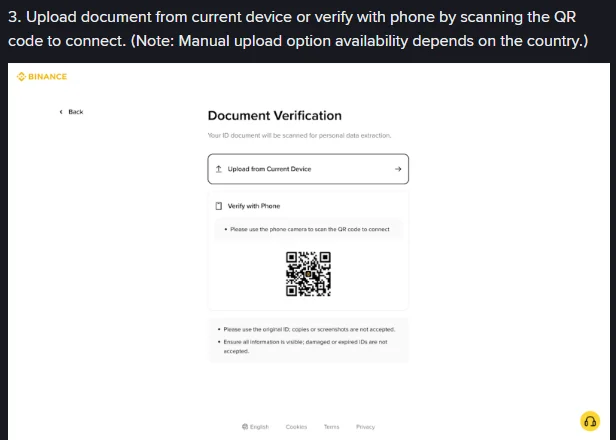
Screenshot: Binance FAQ "How to Complete Identity Verification for a Personal Account?", website step 3 sample screen (example country: Singapore). Captured by Zovrino on 13 September 2026.
Turn those two rules into a pre-upload check:
- Photograph the original. A photo of a scan, a photocopy or your ID displayed on another screen falls under "copies or screenshots".
- Keep all four edges in frame. A cropped edge or a finger over the ID number counts as information that is not visible.
- Kill the glare. Card surfaces reflect overhead lights. Tilt the card slightly or move near a window so no bright patch covers text or the photo.
- Upload both sides of an ID card. Step 4 says both front and back must upload successfully before you can continue.
- Check the expiry date and condition. No camera angle fixes an expired or damaged document. Replace it first.
The liveness check
The liveness check films your face to confirm the person doing the verification is the person on the document. Binance's note for this step is short: enable camera access, do not wear hats, glasses or use filters, and make sure the lighting is sufficient. The sample screen adds that your face and background will be recorded, and asks you to maximise screen brightness and avoid glasses, masks and hats.
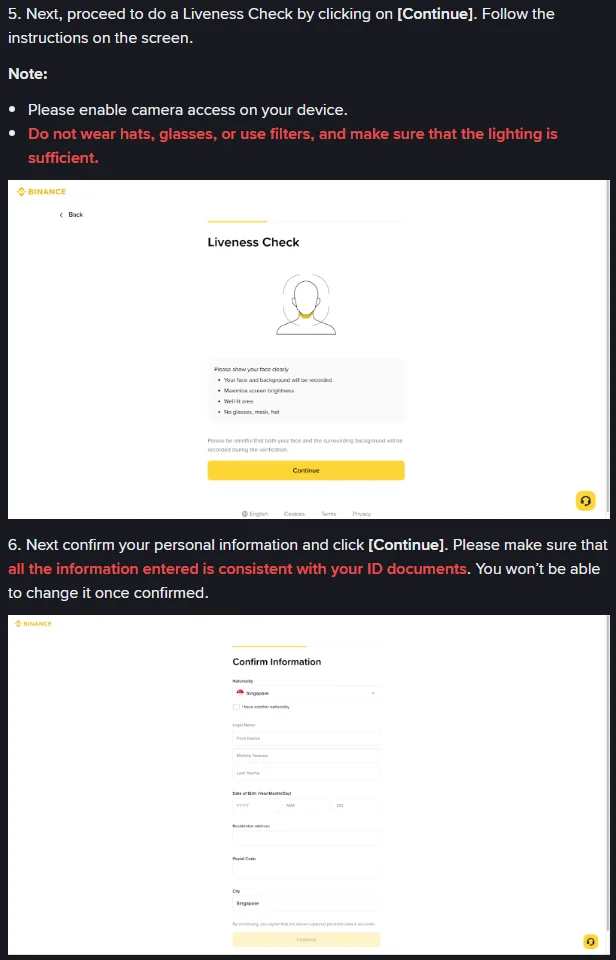
Screenshot: Binance FAQ "How to Complete Identity Verification for a Personal Account?", website steps 5 and 6 (example country: Singapore). Captured by Zovrino on 13 September 2026.
If the liveness step keeps failing, rule these out one at a time:
- Camera permission. Check the permission icon in your browser's address bar or your phone's app settings. On a laptop without a webcam, use the QR code option from step 3 so your phone handles the capture.
- Light behind you. Sitting with your back to a window turns your face into a silhouette. Face the light source instead.
- Anything covering your face. Binance names hats, glasses and masks. Take prescription glasses off for this step too.
- Filters and beauty modes. Some phone cameras apply smoothing by default. Switch it off before you start.
- Refreshing mid-flow. If your connection drops, move to a stable connection and start again rather than refreshing halfway through.
Personal details: you cannot edit them after confirming
Step 6 is the one to slow down on. Binance's FAQ states that all information entered must be consistent with your ID documents and that you won't be able to change it once confirmed.
Compare each field with your document rather than typing from memory: first name, middle names and surname in the same order and spelling, and a date of birth in the year/month/day format the form uses. The address you type here also matters later, because a proof-of-address document has to match it.
If you have already confirmed details that are wrong, resubmitting photos will not fix that. You need the Update Identity route described below, or Binance Support.
Proof of address: the South African detail
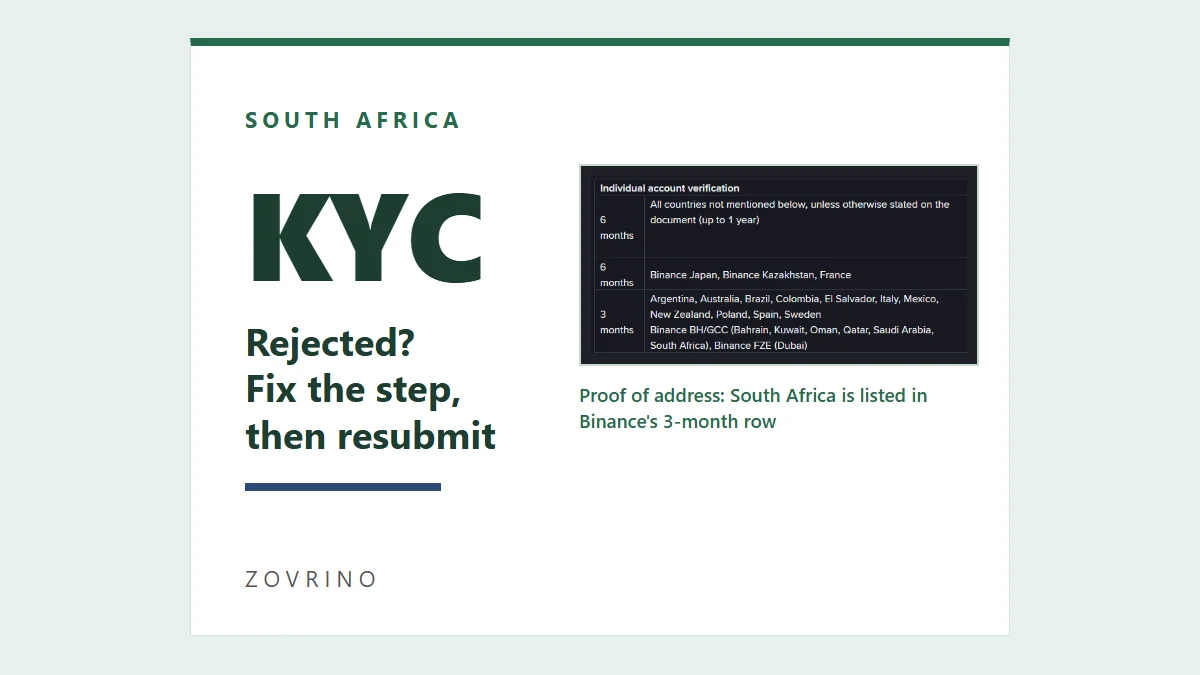
Binance's proof-of-address FAQ says verification may involve one or two documents: proof of identity and proof of address. Not every account is asked for both. If yours is, the requirements are specific, and the validity table is where South African users can get caught out.
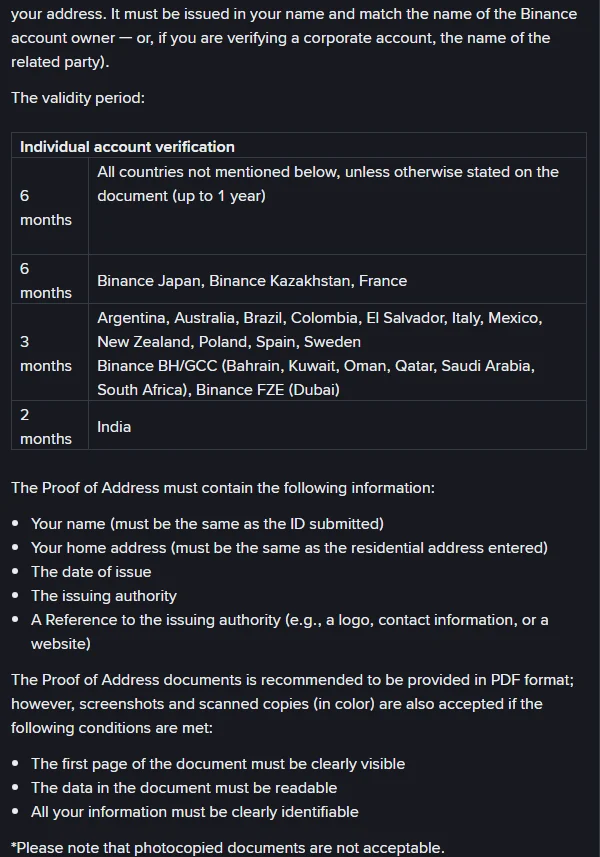
Screenshot: Binance FAQ "How to Verify My Residential Address on Binance? (Applicable to All Users)", section "What is a Proof of Address?". Captured by Zovrino on 13 September 2026.
On the page we checked, South Africa appears in the 3 months row, grouped under "Binance BH/GCC", while the default for countries not listed is 6 months. The page does not explain that grouping further. In practice, a bill that would be recent enough elsewhere can be too old for a South African account. If your verification screen states a different period, follow the screen.
Before uploading, check the document against the FAQ's required details:
- Your name, the same as on the ID you submitted. A bill in a landlord's, parent's or partner's name does not meet this rule, even if you live at that address.
- Your home address, the same as the residential address you entered in step 6.
- The date of issue, inside the 3-month window.
- The issuing authority, plus a reference to it such as a logo, contact details or website.
Documents the FAQ lists as acceptable include utility bills (electricity, water, sewerage), internet or landline bills, bank or credit card statements, stamped or signed bank reference or address confirmation letters, mortgage statements, home insurance statements, and letters or rental agreements from a university residence. If your utilities are billed to a landlord, a bank statement in your own name is often the more realistic option to look for.
The same page lists documents that generally do not count: payslips and employment contracts, transaction receipts, preliminary bank statements, statements showing only bank fees, insurance documents other than home insurance, streaming bills, medical bills and documents addressed to a P.O. box. Mobile phone bills are excluded "except several jurisdictions", and the page does not name those jurisdictions, so do not rely on a cellphone contract bill. A prepaid electricity purchase slip looks like a transaction receipt rather than a bill, so it is unlikely to qualify.
Format matters as well. Binance recommends a PDF. Screenshots and colour scans are accepted if the first page is clearly visible and the data is readable, but photocopies are not. The upload tips ask you to capture the document in portrait mode with all four corners visible, avoid blur, reflections and black-and-white copies, and use PDF, JPG, JPEG or PNG files. Downloading the official statement PDF from your bank is cleaner than photographing a printout.
Resubmit in this order
- Read the rejection reason. Check the Identification page and the email. If it mentions the document, do not change your personal details.
- Fix only that check. Replace the document, retake the photo with all edges visible, sort out lighting and camera permission, or find a proof of address that is recent and in your name. Changing one thing at a time tells you what the problem was.
- Resubmit once, then wait. Allow the review times above before deciding it failed again.
- If confirmed details are wrong or your ID has changed, use Update Identity. Go to the Identification page, click [Update Identity], select a reason, then choose the issuing country and document type and follow the prompts.
- Check your reason is on Binance's list. The FAQ accepts seven: expired documents, a changed name, a changed ID number, a changed nationality, replacing documents to meet a fiat channel's requirements, changing the name to a system-recognisable language, and meeting Binance Card requirements.
- If your reason is not listed, or the rejection makes no sense, contact Binance Support. The Update Identity FAQ says reasons outside the drop-down list should go to customer service. Start the conversation from the Binance website or app, not from a link someone sends you.
One cost of Update Identity is easy to miss. Binance's FAQ says that once you declare an update, your account is restricted to "Withdrawal Only" mode until the new information has been submitted and verified. If you have funds on the account and plan to trade soon, factor that pause in before you start.
What not to do
- Do not use someone else's ID. The FAQ states you cannot transfer your account to another person or substitute another person's ID for your own.
- Do not open a second personal account to try again. Asked whether two personal accounts can be verified, Binance's answer is a separate entity account or up to 5 sub-accounts under your personal account. It does not offer a second verified personal account.
- Do not hand your ID photos, selfie or codes to a "verification agent". Those files are exactly what someone needs to open accounts in your name. The same applies on P2P: our guide to choosing a South African P2P merchant for an EFT payment explains why you should not send identity documents to a counterparty because a chat message asks for them.
- Do not keep resubmitting while a review is pending. Neither FAQ says repeat submissions shorten the queue.
After you are verified
Verification only unlocks the next decision: how your first rand reaches the account. A ZAR transfer made through P2P is not the same thing as a direct fiat deposit, and card purchases and crypto transfers from a local exchange each fail in different ways. Our comparison of ways to fund Binance from South Africa with ZAR sets out those routes, including why you should pay only from a bank account in your own verified name.
Sources and verification
- Binance FAQ: How to Complete Identity Verification for a Personal Account? (page shows updated 2026-06-04)
- Binance FAQ: How to Verify My Residential Address on Binance? (Applicable to All Users) (page shows updated 2026-04-20)
- Binance FAQ: How to Update My Verified Identity Information? (page shows updated 2026-03-13)
Pages and screenshots checked on 13 September 2026, UTC+8. Binance can change these requirements at any time. This article does not claim a retry limit or waiting period after repeated failures, because we could not find one on the current official pages.
If you have not registered yet
Read the Binance referral-code guide. It explains how to verify the official domain, code CG17CR7R and the advertised benefit of up to 20% in trading-fee rebates. Eligibility, products and the final rate depend on the registration page and account terms; Zovrino may receive a commission from an eligible referral. Using a referral link does not change the identity verification requirements.
The code we use is CG17CR7R (link). Typing binance.com yourself gives you the same account.